ChatGPT Visibility
See when ChatGPT mentions your brand, what context it uses, and whether the answer is aligned with the message you want users to see.
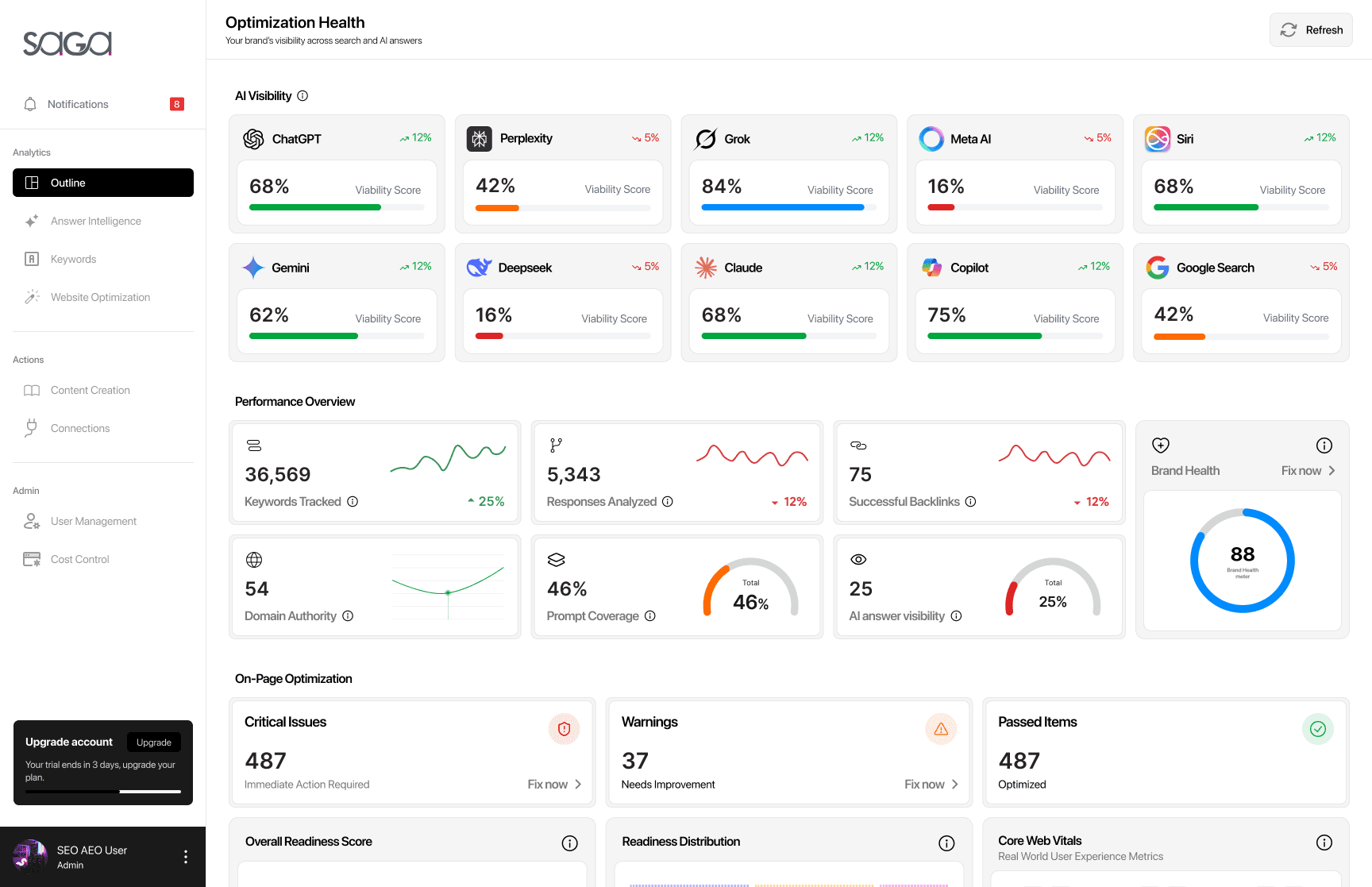
a visibility layer that tracks how your brand appears in ChatGPT, Perplexity, Grok, Meta AI, Gemini, Claude, DeepSeek, Copilot, Google AI Mode, and Google AI Overviews
AI Visibility is a visibility layer that tracks how your brand appears in ChatGPT, Perplexity, Grok, Meta AI, Gemini, Claude, DeepSeek, Copilot, Google AI Mode, and Google AI Overviews. In practical terms, it gives your team a clear way to understand the signals that matter most for modern discovery, whether that discovery happens in search, in an AI assistant, or in a blended answer experience. Instead of guessing how visibility is changing, you get a structured view of where the opportunity sits, what is already working, and what still needs stronger evidence or cleaner execution. That is what makes the feature useful not just for reporting, but for active decision-making across marketing and product teams.
Inside SAGA, ai visibility is designed to turn raw platform output into an editorial or operational decision. That means the feature does more than show you a score or a list. It helps you decide what to fix, what to expand, and what to track next so the work feels connected to business outcomes rather than isolated reports. The result is a repeatable way to move from observation to action without losing the strategic context behind the data.
AI Visibility matters because buyers now move between search engines, AI assistants, and answer-first interfaces without thinking about the boundaries between them. If your brand is invisible or weak in one of those environments, the gap can affect awareness, trust, and demand even when classic SEO metrics still look acceptable. That makes the feature relevant for both growth teams and leadership teams that need to understand why market visibility changes even when traditional analytics appear stable.
For teams working in visibility intelligence, the difference between a useful program and a noisy one is usually clarity. A strong ai visibility workflow helps you see where you are winning, where competitors are pulling ahead, and which pages or prompts deserve immediate attention. It also creates a shared language between content, SEO, and operations so improvements can be prioritized without long back-and-forth meetings.
Teams often know they need AI visibility, but they do not know where their brand is being mentioned, omitted, or summarized incorrectly across different models.
Traditional rank tracking stops at blue links, so it misses the conversational, source-citing, and answer-first surfaces that now influence discovery.
The lack of a unified view makes it hard to tell whether a prompt is winning in one assistant but invisible in another.
AI Visibility in SAGA solves the analysis problem by pulling the relevant signals into one repeatable workflow. That keeps the team from toggling between exports, screenshots, spreadsheets, and point tools just to answer a simple question about performance. The platform turns the output into a shared source of truth that content, SEO, and leadership can understand together, which lowers the friction of turning findings into actual tasks. It also helps new teammates ramp faster because the logic of the review is visible in one place.
The other advantage is prioritization. Instead of asking the team to improve everything at once, SAGA helps you focus on the pages, prompts, sources, or assets that are most likely to move the result. That creates a more realistic operating model, because small teams can still make strong progress when the next step is obvious. In practice, that means the platform can support both quick wins and deeper strategic work without forcing you to choose between them.
SAGA brings multiple AI surfaces into one dashboard so teams can compare visibility by engine, topic, and prompt pattern without jumping between tools.
The platform helps you separate true visibility gains from random mentions by showing which engines cite your pages, which ones summarize you, and which ones skip you entirely.
Because the data is structured around visibility actions, marketers can move from observation to optimization quickly.
Each sub-feature below is explained in practical terms so the page can be used as both a product explainer and an SEO landing page.
See when ChatGPT mentions your brand, what context it uses, and whether the answer is aligned with the message you want users to see.
Track how Perplexity references your site, which pages it favors, and where your competitors are winning citations.
Monitor how Grok presents your brand in fast-moving, social-aware conversations. The output helps teams see whether their current messaging is strong enough to travel through lightweight AI answers.
Review how Meta AI handles your brand in conversational summaries and discovery prompts. This is useful for teams that care about broader awareness signals across consumer platforms.
See how Gemini interprets your content and what pages it prefers when it constructs answers.
Review whether Claude recognizes your brand, products, and core topics with enough clarity to cite or summarize them. This gives content teams a clean signal for improving language, context, and supporting evidence.
Track DeepSeek outcomes so you can spot differences in prompt handling, citation behavior, and answer shape. That comparison helps teams understand whether their content is broadly understandable or only optimized for one model family.
Measure how Microsoft Copilot sees your domain inside productivity-oriented and research-style queries. This is especially helpful for brands that want to appear in enterprise decision workflows.
Check whether Google AI Mode surfaces your pages when users move from search to answer mode.
See if your pages are being pulled into AI Overviews and how the answer package frames your brand.
A brand team wants to know whether new thought leadership is showing up in AI answers.
An SEO team wants to compare visibility across models before launching a new content cluster.
A founder wants to verify that the company is being represented accurately in answer engines.
A growth team needs proof that AI visibility improvements are translating into strategic coverage.
Every feature page includes a table so teams can compare SAGA against manual workflows or disconnected tools.
| Dimension | SAGA | Manual / Point Tool |
|---|---|---|
| Coverage | SAGA gives a unified view of ai visibility across the signals that matter most. | Manual reviews or isolated point tools usually capture only a slice of the full picture. |
| Priority | Findings are organized so the next action is easier to choose and defend. | Generic reports often show issues without making it clear which ones matter first. |
| Collaboration | SEO, content, product, and leadership can work from the same dashboard and language. | Disconnected tools make it harder for teams to agree on the next move. |
| Momentum | You can repeat the workflow as pages and prompts change over time. | One-off analysis slows momentum and makes it harder to measure progress. |
Enter your domain or select a specific page or topic that you want to track across the major AI search engines.
SAGA scans ChatGPT, Perplexity, Claude, Gemini, and other engines to analyze mentions, summaries, and citation links.
Review your share of voice, check citation health, and compare visibility distribution directly with your competitors.
Identify visibility gaps, optimize underrepresented pages, and monitor how your brand authority grows over time.
Eight FAQs are included on every feature page so the page can answer common purchase, usage, and workflow questions directly.
Get started with SAGA's comprehensive visibility audit and platform-by-platform optimization checklist.